
Cameractrls
Read our comprehensive review of Cameractrls for Linux. Learn how this powerful tool lets you easily adjust V4L2 settings and non-standard camera controls.
The Challenge of Managing Webcams on Linux
Linux users frequently face a frustrating hurdle: webcam software provided by manufacturers is almost exclusively built for Windows or macOS. Without proprietary control panels, adjusting basic image properties or accessing advanced hardware features like high-dynamic-range toggles, field-of-view adjustments, or manual focus can feel nearly impossible. This often leaves users stuck with default, unoptimized video feeds during critical virtual meetings or live streams.
Created by developer Gergo Koteles, Cameractrls Linux camera control solves this exact problem. It bridges the gap by offering a dedicated, highly extendable application to manage your video input settings directly on Linux distributions.
What is Cameractrls?
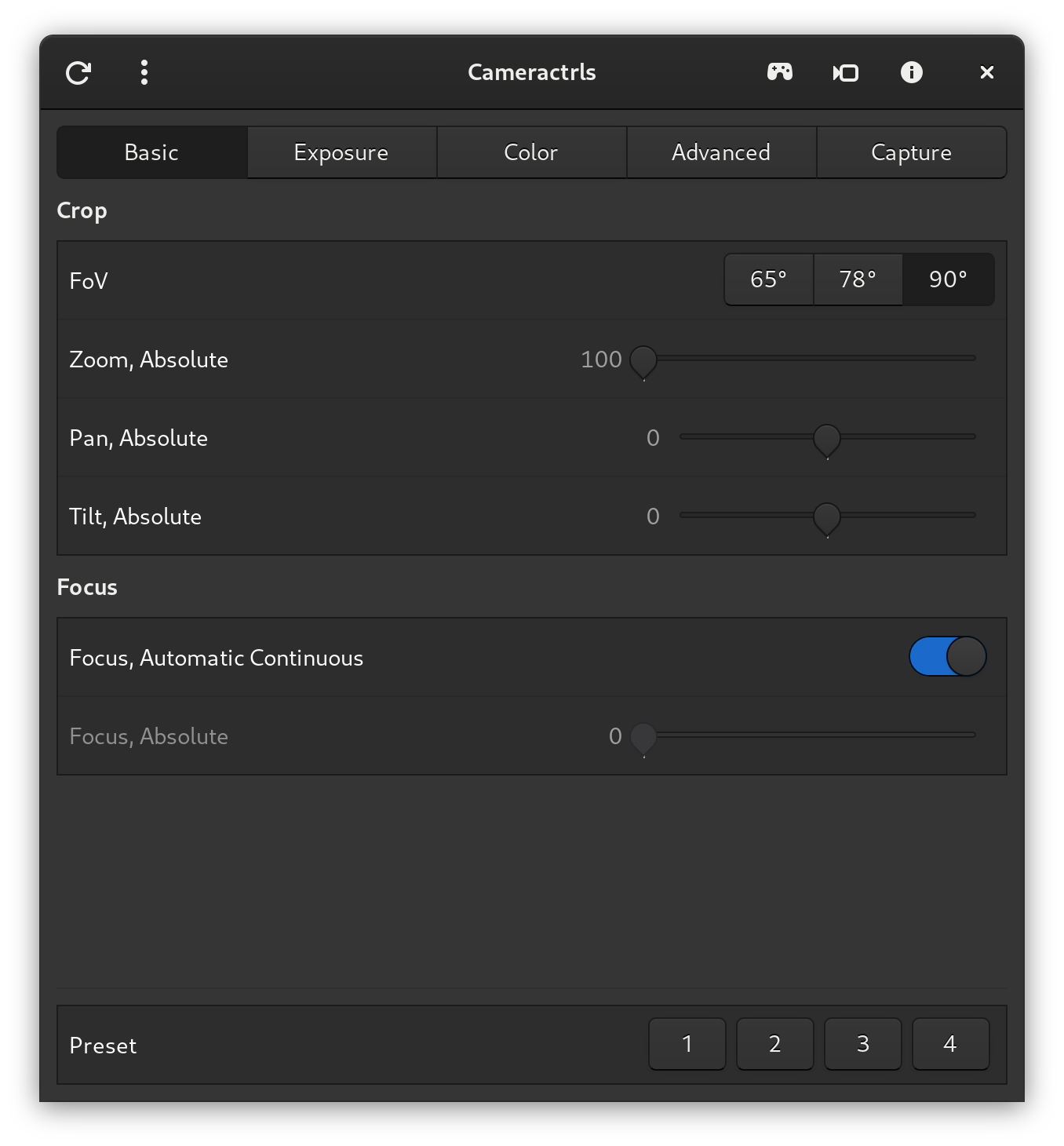
At its core, Cameractrls is a standalone Python-based utility that provides both a command-line interface (CLI) and graphical user interfaces (GTK3 and GTK4), alongside an SDL-based camera viewer. The application is designed to interact natively with Video4Linux (V4L2) controls, allowing you to fine-tune standard video parameters. What makes this utility particularly powerful is its capability to handle non-standard, manufacturer-specific hardware extensions that are typically locked behind proprietary software.
Robust Extension Support for Leading Webcams
Rather than limiting users to generic V4L2 options, this software features targeted extensions for popular hardware, including:
- Logitech: Take command of LED modes, LED frequency, BRIO Field of View (FoV), relative pan/tilt, and custom PTZ presets.
- Razer Kiyo Pro: Toggle HDR and HDR modes, adjust FoV, switch autofocus (AF) modes, and save your configurations directly.
- Dell UltraSharp WB7022 & AnkerWork C310: Access specialized hardware controls unique to these premium webcams.
- Preset Management: Create, save, and restore custom control configurations so your camera looks exactly how you want it to for every session.
- Control Restore Daemon: A background service that automatically re-applies your saved presets the moment you connect your device.
Who is Cameractrls For?
This utility is a must-have for Linux-based remote professionals, content creators, and system administrators who require precise control over their video capture devices. Whether you need to quickly adjust your frame during a call using the GTK interface or automate camera profiles via the CLI, the tool adapts seamlessly to your workflow. It transitions your webcam from a simple plug-and-play device into a fully customizable production tool.
Get Started with Cameractrls
If you are ready to take full ownership of your video quality and eliminate default webcam frustrations, this utility offers the comprehensive toolset you need. To explore the software, view installation instructions, or download the application for your setup, head over to the official Flathub store page today.